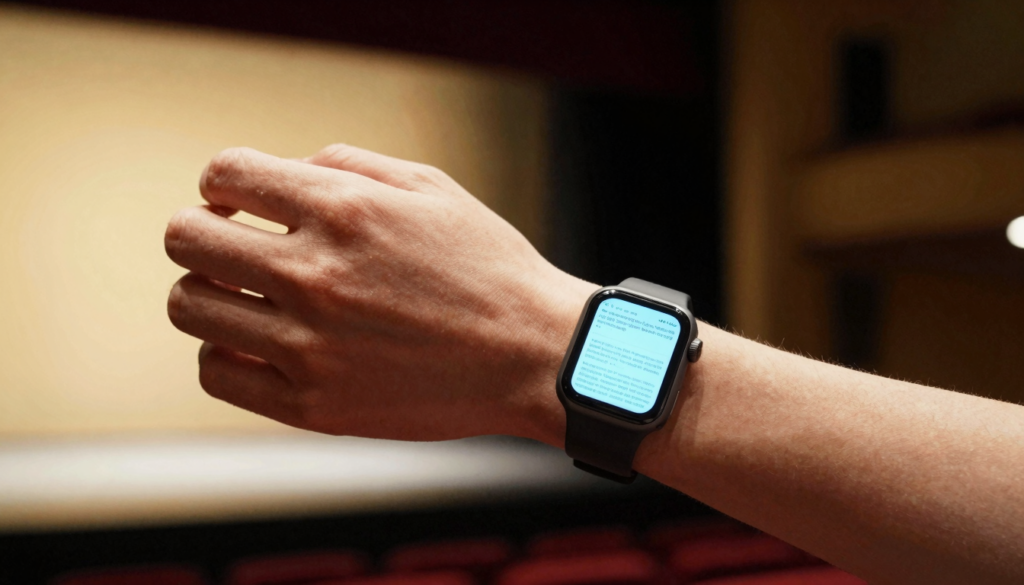
Yes, you can read your lines on an Apple Watch with WristFile, which sends your script from your iPhone to your wrist for discreet, offline rehearsal.
Why actors read lines on an Apple Watch
Actors lose time juggling paper sides and phone screens during rehearsal. An Apple Watch fixes that. Your lines sit on your wrist, ready in a glance.
A wrist screen is always with you. You do not dig through a bag for printed sides. You raise your arm and the next line appears.
WristFile loads your script as a PDF, Word file, or plain text. The file lives on the watch itself. No phone or signal is needed once it syncs.
This matters during tech rehearsals. Phones often get banned backstage. A watch stays on your wrist and draws no attention.
I keep a scene breakdown on my wrist during table reads. A quick glance confirms my next cue. My eyes stay on the other actors, not on a binder.
The watch also helps with memorization drills. You scroll one line at a time. You read, look away, and recite, then check the next line with a flick of the wrist.
Casting calls reward this habit too. You wait in a hallway with twenty other actors. A printed page shakes in nervous hands. A watch script stays steady and private.
The small screen forces focus. You see a few lines at once, not a wall of text. That chunking mirrors how actors learn, beat by beat.
Battery life supports a full day. A modern Apple Watch runs about 18 hours on a charge, per Apple. That covers a rehearsal, a commute, and an evening performance.
The takeaway is simple. A watch turns dead time into rehearsal time. Every glance becomes another pass through your lines.
How to get your script onto your Apple Watch
Loading a script takes under a minute. You start on your iPhone and finish on your wrist. Here is the exact flow with WristFile.
- Export your script as a PDF, DOCX, or TXT file on your iPhone.
- Open the WristFile app on your iPhone.
- Tap the import button and pick your script file.
- Select your Apple Watch as the destination.
- Wait for the sync bar to finish.
- Open WristFile on your watch and tap the script.
The file transfers over Bluetooth or Wi-Fi. Apple covers this pairing in the Apple Watch User Guide. A short script syncs in seconds.
Plain text files sync fastest. A TXT script is tiny. A heavy PDF with images takes longer.
Keep the file under a few megabytes for speed. Strip large cover images from the PDF first. The words are what you need on stage.
| File type | Best for | Sync speed |
|---|---|---|
| TXT | Memorizing raw lines | Fastest |
| Formatted sides with stage directions | Moderate | |
| DOCX | Scripts straight from a writer | Moderate |
Once synced, the script stays on the watch. You can put your iPhone in airplane mode. The lines still open offline.
For long-form rehearsal, see our guide on discreet speech notes for speakers. The same workflow fits a monologue.
The takeaway: export, import, sync, done. Repeat it once and it becomes muscle memory.
Formatting your script for a tiny screen
A 41mm or 45mm screen is small. Good formatting makes lines readable at a glance. A few edits before syncing pay off all day.
Increase the font size in your source file first. Use at least 18 point text. Large type means fewer squints under stage lights.
Break the script into short lines. One sentence per line reads better than a dense block. The watch shows each beat cleanly.
Remove wide stage directions where you can. Long parentheticals waste screen space. Keep only the cues you actually need.
Use bold for your character name. Your eye finds your lines faster. You skip past other characters in a glance.
Convert formatted scripts to PDF to lock the layout. A PDF holds your spacing exactly. Wikipedia describes the PDF as a fixed-layout format, which is why it travels well.
High contrast helps too. Black text on a white background beats gray on cream. The always-on display stays legible outdoors.
I split a feature script into one file per scene. Each file opens fast. I jump straight to the scene I am shooting.
For tables of blocking or shot lists, keep columns narrow. A two-column layout fits the watch. Three columns force side scrolling.
The takeaway: format for glances, not for reading. Big type, short lines, bold names, tight layout. Your wrist becomes a clean teleprompter.
Reading lines discreetly on set or on stage
Discretion is the real win on a watch. A glance at your wrist looks natural. Nobody reads it as breaking character.
On stage, you can place blocking notes on your wrist. A quick check during a scene change keeps you on track. The audience sees a normal gesture.
On a film set, phones draw attention and ring at bad times. A watch in airplane mode stays silent. Your sides stay private between takes.
WristFile reads offline, so no notification interrupts a take. The screen shows only your script. This mirrors how speakers use the watch for hidden notes.
Raise to wake controls when the screen lights up. You lift your wrist and the line appears. You drop your arm and it dims.
For improv or audience interaction, a wrist cue is gold. You glance, recall the next bit, and keep the energy up. No fumbling with cards.
Dim the brightness in dark theaters. A bright watch face breaks the fourth wall. Lower it so only you can read.
I once kept a cold-open monologue on my wrist for a live show. One glance before the lights rose settled my nerves. The page never left me.
Use a simple watch face during a performance. A cluttered face competes with your script app. Keep it clean so the document opens fast.
The takeaway: the wrist hides in plain sight. It gives you a safety net without breaking the scene.
Read documents on your wrist
WristFile sends PDFs, Word, Excel and text files from your iPhone straight to your Apple Watch, offline and with no phone needed.
Get WristFile on the App Store →Using the Digital Crown to scroll through your script
The Digital Crown turns scrolling into a precise act. You rotate it and the page moves. No pinching on a small screen.
Spin the crown slowly to advance line by line. This pace suits memorization. You reveal one cue at a time.
Spin it faster to cross a long scene. The page flies and then settles. You land near the part you need.
The crown beats finger swipes for control. A fingertip can smudge the glass and overshoot. The crown stops exactly where you release it.
Apple builds the Digital Crown into watchOS, and developers wire scrolling around it, as shown on the watchOS developer pages. WristFile uses that same input.
You can also tap the screen to page forward in some layouts. Tapping frees your other hand. That helps when you hold a prop or a coffee.
For quick context, the Digital Crown has been a core control since the first Apple Watch. Actors who know it work faster.
I scroll with the crown during line runs with a partner. They feed me a cue. I glance, confirm, and the crown waits for my next pass.
Pair the crown with bookmarks if your script is long. Jump to act two without spinning forever. The crown handles fine movement, bookmarks handle big jumps.
The takeaway: let the crown do the work. It scrolls clean, stops sharp, and keeps your fingers off the glass.
Rehearsing offline, anywhere you go
Lines stick through repetition. A watch lets you rehearse in the gaps of a day. Offline access removes every excuse.
Once your script syncs, it lives on the watch. You do not need signal or your iPhone. The file opens in a subway tunnel or on a remote location shoot.
Waiting rooms become rehearsal time. You glance at a scene between auditions. Each glance is another pass.
A walk turns into a line run. You can even read while moving, as covered in our guide on reading documents on Apple Watch while running. Lines and cardio at once.
Travel days suit the watch. On a plane in airplane mode, your script still opens. You arrive at the shoot off-book.
Battery anxiety fades with offline reading. Reading a document uses little power. Apple notes the all-day battery target on its support pages.
I rehearse during my morning coffee. The watch sits on my wrist already. No setup, no laptop, just the next scene.
Keep several scripts on the watch at once. Storage holds many text files easily. You switch projects without touching your phone.
Sync new pages the night before. Writers send revisions late. A quick import keeps your wrist current for the morning call.
The takeaway: offline means always ready. Your lines follow you into elevators, planes, and green rooms. Rehearsal stops waiting for the right moment.
Apple Watch script reading vs other methods
Actors have used paper, phones, and tablets for years. Each has a place. The watch wins on portability and discretion.
Paper sides are reliable but bulky. They rustle, they fall, and they cannot search. You also carry a pen and a clip.
A phone holds the whole script but rings and glows. It gets banned on many sets. It also tempts you toward messages.
A tablet shows large pages but is heavy to hold. It works on a music stand, not in a hallway. You cannot rehearse one-handed.
The watch trades screen size for presence. It is always on your wrist. That tradeoff favors quick glances over deep reading.
| Method | Discretion | Always with you | Offline | One-handed |
|---|---|---|---|---|
| Apple Watch | High | Yes | Yes | Yes |
| Paper sides | Medium | No | Yes | No |
| iPhone | Low | Yes | Yes | Yes |
| Tablet | Low | No | Yes | No |
The watch is not for reading a full act in one sitting. It is for cues, beats, and quick checks. Pair it with a full read at home.
Many actors use the watch alongside paper. They learn from the page and confirm on the wrist. The two methods support each other.
The takeaway: pick the tool for the moment. The watch owns the on-set and in-line moments that other tools miss.
Frequently Asked Questions
What is the best app to read PDFs on an Apple Watch?
WristFile is the best app to read PDFs on an Apple Watch. It sends a file from your iPhone to your wrist with one tap, then reads it offline. WristFile supports PDF, Word, Excel, and plain text, so a script in any format loads cleanly. You scroll with the Digital Crown and zoom without pinching the small screen. For actors, that means your lines sit on your wrist during rehearsal, with no phone and no signal required. The file stays on the watch until you delete it.
Can I read a full movie script on an Apple Watch?
Yes, you can read a full movie script on an Apple Watch, though the small screen suits glances more than long reading. Split a feature into one file per scene so each opens fast. A 90 to 120 page PDF fits on the watch, but plain text syncs quicker. Use the Digital Crown to move through pages, and bold your character name to find lines fast. Most actors keep the whole script on the wrist for reference and learn the bulk from a larger screen at home. The watch shines for cues and quick checks.
How do I memorize lines using my Apple Watch?
To memorize lines on an Apple Watch, reveal one line at a time and recite it before checking the next. Format your script with short lines and 18 point text so each beat reads clearly. Rotate the Digital Crown slowly to advance, then look away and speak. Repeat the scene during small gaps in your day, like a commute or a coffee break. Offline access means you rehearse without your iPhone or any signal. The wrist makes every spare minute another pass through your lines, which is how repetition builds memory.
Is it discreet to read lines on an Apple Watch on stage?
Reading lines on an Apple Watch is highly discreet on stage. A glance at your wrist looks like a natural gesture, so the audience does not notice. Lower the screen brightness in a dark theater so the light stays private. Keep a clean watch face so your script app opens fast. WristFile reads offline, which means no notification interrupts a scene. Many performers keep blocking notes or a cold-open cue on the wrist as a safety net. The watch gives you backup without breaking character or pulling out a phone.
What file formats can I use for my script on Apple Watch?
You can use PDF, Word (DOCX), and plain text (TXT) files for your script on an Apple Watch with WristFile. Plain text syncs fastest and suits raw line memorization. PDF locks your formatting, so sides with stage directions keep their layout. Word files work when a writer sends a script straight from a document. Excel even handles shot lists or blocking grids. For speed, keep files small and strip heavy cover images before you sync. Pick the format that matches how you rehearse, then load it once to your wrist.
Does reading a script on Apple Watch drain the battery?
Reading a script on an Apple Watch uses very little battery. Displaying a static document is a light task, so a rehearsal barely moves the charge. Apple targets all-day battery life of about 18 hours, which covers a commute, a rehearsal, and an evening show. To save more, lower the brightness and avoid leaving the screen lit between glances. Offline reading also helps, since the watch is not pulling data. Sync your script the night before, charge overnight, and your lines stay ready for the full shooting day.
Your documents, right on your wrist.
WristFile turns your Apple Watch into a document reader for PDF, Word, Excel and text files, synced from your iPhone and readable offline.
Download WristFile Free